
Download Leawo Blu‑ray Player – Free, Secure, Multi‑Platform Blu‑ray Playback
Overview – Why Leawo Blu‑ray Player Stands Out
Leawo Blu‑ray Player is a free, cross‑platform multimedia tool that lets Mac and Windows users enjoy high‑definition Blu‑ray, DVD, and ISO files without the need for expensive licences. Developed by Leawo Software Co. Ltd., the player falls under the Education & Reference category with a focus on science‑related media playback.
Since its inclusion in software directories in 2016, the application has attracted a modest but steady user base, with two downloads recorded in recent weeks. The current stable release, version 1.9.0, was last updated on 1 April 2017, ensuring basic compatibility with modern Mac OS X versions and providing language support in English, Spanish, and German. Though the installer size isn’t publicly disclosed, the lightweight nature of the program makes it a convenient addition to any media‑center setup.
Users looking for a reliable, free Blu‑ray solution will appreciate Leawo’s emphasis on security, regular (albeit infrequent) updates, and a user‑friendly interface that balances simplicity with enough advanced options for power users.
Features, Compatibility, and Real‑World Pros & Cons
Key Features
- Native playback of Blu‑ray, DVD, and ISO images in full HD (1080p) resolution.
- Support for multiple audio tracks, subtitles, and 3‑D video formats.
- Simple drag‑and‑drop interface for instant media loading.
- Compatibility with macOS (OS X 10.7 and later) and Windows 7/8/10.
- Multi‑language UI (English, Spanish, German) for broader accessibility.
- Free of hidden fees, registration, or forced upgrades.
- Secure playback engine that avoids installing third‑party codecs.
Operating System Compatibility
Leawo Blu‑ray Player runs on macOS (including OS X Mavericks, Yosemite, and later) and on Windows platforms from Windows 7 up to Windows 10. The application is optimized for both Intel‑based Macs and standard PC hardware, delivering smooth playback without demanding high‑end graphics cards. Users on older operating systems may experience limited performance, but the core functions remain stable.
Pros & Cons
Pros- Completely free with no hidden costs.
- High‑definition playback of Blu‑ray and DVD files.
- Lightweight installer and low system resource usage.
- Multi‑language support for global users.
- No additional codec packs required.
- Last major update was in 2017; newer codecs may be unsupported.
- Lack of advanced editing or streaming features.
- Installation size not published, which may concern some users.
- Limited community support compared to larger competitors.
- No native Linux version.
Installation & Usage – Getting Started Quickly
Downloading Leawo Blu‑ray Player is straightforward. Visit the official Leawo website or a trusted software repository, click the “Download for macOS” button, and save the .dmg file to your computer. For Windows users, a .exe installer is provided. Once the file is downloaded, follow these steps:
- Mac: Open the .dmg file, drag the Leawo Blu‑ray Player icon into your Applications folder, and launch the app from Launchpad. macOS may prompt you to confirm that you want to open an app from an unidentified developer; click “Open” to proceed.
- Windows: Run the .exe installer, accept the license agreement, choose the destination folder, and click “Install.” After installation, you can launch the player from the Start menu.
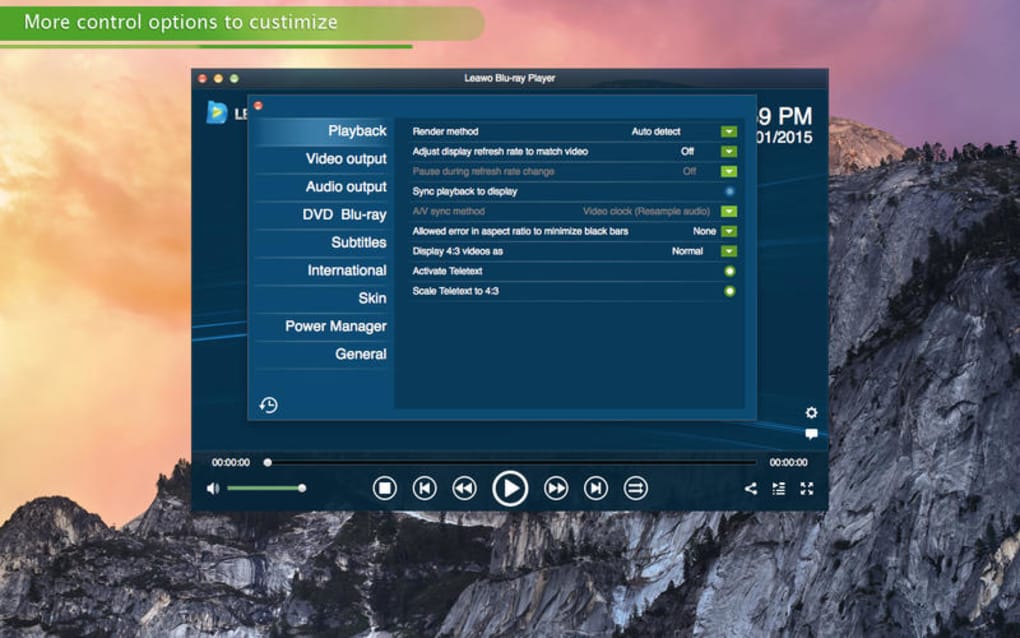
- When the player opens, you’ll see a clean interface with a central “Open File” button. Drag any Blu‑ray, DVD folder, or ISO image onto the window, or use the “File → Open” menu to browse your media.
- Playback begins automatically. Use the on‑screen controls to pause, skip, adjust volume, or toggle subtitles. The player also supports right‑click context menus for audio track selection and subtitle language changes.
- For 3‑D Blu‑ray discs, enable the “3‑D mode” from the View menu, and wear compatible glasses to enjoy the full effect.
Because Leawo Blu‑ray Player does not require additional codecs, you avoid the typical hassle of codec packs that can clutter your system. Updates, though infrequent, can be checked via the “Help → Check for Updates” menu item. If you encounter any playback issues, consult the FAQ section below, which addresses common problems such as missing subtitles, audio sync, or unsupported disc formats.
FAQ & Final Thoughts – Your Questions Answered
Is Leawo Blu‑ray Player truly free, or are there hidden fees?
Yes, the player is completely free. There are no registration fees, no forced upgrades, and no hidden in‑app purchases. You can download, install, and use all features without paying a cent.
Can the player handle encrypted Blu‑ray discs?
Leawo Blu‑ray Player supports most commercially encrypted Blu‑ray discs using its built‑in decryption engine. However, extremely new DRM schemes released after the 2017 update may not be recognized.
What audio and subtitle formats are supported?
The player supports Dolby Digital, DTS, and LPCM audio streams, along with common subtitle formats such as SRT, SUB, and embedded Blu‑ray subtitles. You can switch tracks from the right‑click menu during playback.
Is the software safe to install on my Mac?
Leawo is a reputable developer, and the player is signed with a valid Apple developer certificate. It does not bundle adware or spyware, making it a secure choice for macOS users.
How do I update Leawo Blu‑ray Player when a new version is released?
Open the application, go to Help → Check for Updates. If a newer version is available, the program will prompt you to download and install it automatically.
In conclusion, Leawo Blu‑ray Player delivers a solid, no‑cost solution for anyone who needs reliable Blu‑ray and DVD playback on macOS or Windows. Its lightweight design, multi‑language support, and straightforward interface make it an attractive alternative to pricier commercial players. While the lack of recent updates may limit compatibility with the newest disc protections, the core playback experience remains robust for the majority of existing media libraries. If you’re looking for a free, secure, and easy‑to‑use Blu‑ray player, download Leawo Blu‑ray Player today and enjoy high‑definition video without hassle.







